Showing posts with label Spelling. Show all posts

Saturday, October 26, 2013

Review on: VocabularySpellingCity


About VocabularySpellingCity:

VocabularySpellingCity is an on-line award winning game learning tool for students in grades K-12. The program encompasses subjects such as vocabulary, spelling, writing, and language arts. VocabularySpellingCity offers customizable sentences and definitions. Teachers and parents have the ability to save their customized lists. If you do not have your own list, the program offers over 50,000 words and 60,000 sentences read by a real person. VocabularySpellingCity also has twenty five games to play on-line or to print such as "Hang Mouse", "Crossword", "Word Search", "Word-O-Rama", "Vocabulary Test Me", and "Alphabetize." Free printable handwriting worksheets and teacher training videos are also available. The teaching resources with lesson plans are very beneficial for instructors. Teachers also have parent letters available as a PDF form to print and send home with the student's word list. VocabularySpellingCity offers a free version and also the Premium MembershipWith this option the user will receive:
  • Vocabulary, writing, spelling, and language arts activities
  • Access to ALL games and interactive Flash Cards
  • Student progress tracking
  • Automated testing and grading
  • Personalized learning with assignments for differentiated instruction
  • Student logins with no commercial ads


 Families Up to 5 students $29.99
Price subject to change without notice.


Our Homeschool Experience:

My daughter really enjoyed playing some of the games provided by VocabularySpellingCity. One of her favorites was "Hang Mouse." "Hang Mouse" is an on-line version of hangman. To play she would click on the letters one at a time and try to complete the word before the cat caught the mouse. This is one of the games offered for free. "Word-O-Rama" was another game she wanted to try out. "The object of "Word-O-Rama" is to identify words by their definitions, synonyms, antonyms, or by their context within a sentence." She also enjoyed completing the "MatchIt Definitions." In this vocabulary game, she had to match the word to its correct definition. "MatchIt Defitions" was also able to be printed.

Since we have been learning about the different parts of speech, I had her try the game "Parts of Speech." The object of the "Parts of Speech" game is to identify the part of speech of the given word as it is used in each sentence.This game provided a fun way for her to learn not only the different parts of speech, but the parts of a sentence as well. "Word Find" was a fun educational game that helped her learn her spelling words while searching for new ones. The game also provided an opportunity for her to make other words using the letters in each word on her spelling list. The more spelling words she found, the more points she earned.

The "Teacher Resources" page had many useful lessons, word list, educational articles, and how to videos. The "Premium Teacher Tool Box" had all of the links the teacher/parent would need to review the students' grades, manage the assignments, and many other useful information.

We loved VocabularySpellingCity and we would recommend it.


I have been given this product free of charge for review purposes. 

"Read what the rest of the Crew had to say about VocabularySpellingCity."


Monday, March 11, 2013

READS Parent/Child Reading Comprehension System


 Really Easy And Dynamic Strategies
 
About R.E.A.D.S. :

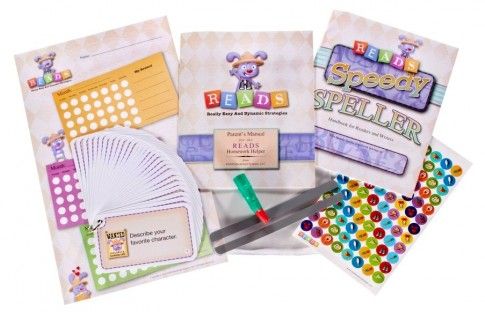
R.E.A.D.S.  is a set of tools and strategies that help children from 1st - 4th grade become better students by providing reading comprehension skills, improving reading proficiency, and promoting independence. READS is designed to follow the Common States Standards and helps develop critical thinking skills. The tools and strategies may be used with fiction or non fiction reading materials including those in your child's school reading program. The question cards are designed so that the adult does not have to read the entire book to check for comprehension. The child's answers to the cards' questions will reveal if she read and understood the reading material. The strategies are designed for children reading at, below, or above reading level. R.E.A.D.S. tools and strategies provide the opportunity for the child to improve her verbal skills by promoting conversation between the child and the parent.


  • READS Parent’s Manual "Describes how to use READS with your child.  Explains each component of READS, how to develop a dialog with your child about their reading and the meaning of each question card."
  • Question Cards and ring – "30 question cards designed to ensure your child’s focus on the reading material, help you determine if your child comprehended the material read, and to develop your child’s critical thinking skills.  Each card also contains a visual clue that matches the question on the card."
  • Rewards Chart & Stickers –"Kids love to track their progress and have tangible goals that are meaningful to them.  The Rewards Chart and stickers help them do just that." 
  • Magic Finger and Reading Guide Strip - "The Magic Finger helps your young reader track the text from word to word and prevents her from losing her place as she reads. The Reading Guide Strip highlights the line being read and blocks out the lines of text above and below to focus your child’s attention on one sentence at a time."
  • Speedy Speller – "Speedy Speller, a Handbook for Readers and Writers puts young writers in charge and provides them with their own spelling handbook that keeps growing.  The Speedy Speller contains 1,400 words along with commonly used abbreviations, numbers, symbols, punctuation and more."

Contact Information
$19.99
Price is subject to change.


Homeschool Experience:

I really appreciated the READS comprehension  questions and reward chart. After my daughter would finish reading a book, I would go over some of the comprehension questions and have her choose which questions she wanted to answer. Her favorite questions were the ones with the carrot on the right hand corner. These questions where the higher level thinking questions. One of the questions asked "While you are reading, find an example of a simile." A few months ago, I had taught her what a simile is so this question gave me an opportunity to review. A question that she really enjoyed answering was "What question would you like to ask the author?" She is very creative and this question gave her an opportunity to think outside the box. Another question asked her to select two vocabulary words and give a synonym and antonym for each. She learned what these two words mean so this was another opportunity for review. When she would finish answering the questions, she would place a sticker on the reward chart. Her reward was to have ice cream once she filled up the entire row with stickers. We do not eat sugar very often so this was a big deal for her.

The Speedy Speller was so easy to use since all of the words were in alphabetical order. Towards the end of the handbook, the book provided an opportunity for my daughter to review punctuation marks, capitalization rules, and abbreviations. READS has not only provided an opportunity for me to make sure my daughter understood what she had read but it also allowed me to review language art lessons. I really appreciated the tools and strategies provided by R.E.A.D.S. and I would recommend it.


TOS

I have received this product free of charge for review purposes.

"Read what the rest of the Crew had to say about READS"


Creative Child Magazine Creative Toy Awards 2011 - Seal of ExcellenceThe National Parenting Center - Seal of Approval 2011

Tuesday, November 6, 2012

Excellence in Writing


Home

Excellence in Writing:

Excellence In Writing is a program that teaches students from grades K-12 how to write well. "In order to succeed in every area of life, children must hone the skills needed to communicate confidently and effectively. Through the process of learning to write well, students learn how to think clearly and to express themselves eloquently and persuasively." Excellence in Writing offers two programs PAL Reading and Primary (K-2) Primary Arts of Language. The reading program uses poetry to teach phonics and whole words. Each student is introduced to letters through stories and with daily games the lessons are reinforced. PAL Reading should be used in conjunction with PAL Writing.

$69.00

The Language and Reading package includes:


  • Primary Arts of Language: Reading Teacher’s Manual
  • Primary Arts of Language: Reading DVD-ROM

    • Instructional Video by Jill Pike
    • The Four Language Arts MP3 Audio by Andrew Pudewa
    • Nurturing Competent Communicators MP3 Audio by Andrew Pudewa
    • Poetry as an Integrator MP3 Audio by Anna Ingham
    • Intro to the Blended Sound Sight Program MP3 Audio by Anna Ingham
    • Primary Arts of Language: Reading Student Book (e-book)
      (Would you rather have us print out your PAL student e-books for you? Click here)


  • Primary Arts of Language: Phonetic Games
  • Primary Arts of Language: Phonetic Farm folder with Stickers

  • Primary Arts of Language is their writing program. The program introduces letters through printing practice.This program is divided into three parts: printing, copy work, and composition. For the printing section the student learns how to correctly form her letters. She will learn her letter sounds by learning how to write them. "The copy work exercises will make printing automatic in preparation for the composition lessons, which will gently teach your student to write stories and paragraphs with style."

    All About Spelling is the spelling program that Excellence in Writing uses. The spelling program teaches your child what she needs in order to know how to spell. The lessons are multisensory and mastery - based. The child will learn by using sight, sound, and touch. All About Spelling uses letter tiles, flash cards, word banks, spelling lists, dictation, and writing exercises.

     
    $89.00

    Writing package includes:


  • Primary Arts of Language: Writing Teacher’s Manual
  • Primary Arts of Language: Writing DVD-ROM

    • Includes the following:
    • Instructional Video by Jill Pike
    • Reading Comprehension MP3 Audio by Adam Andrews
    • Dictation, Narration, and Public Speaking MP3 Audio by Andrew Pudewa
    • The Four Language Arts MP3 Audio by Andrew Pudewa
    • Primary Arts of Language: Writing Student Books (e-book)
      (Would you rather have us print out your PAL student e-books for you? Click here


  • All About Spelling Basic Interactive Kit
  • All About Spelling Level 1 (Teacher’s Manual and One Student Material Packet) By Marie Rippel
  • Bonus e-audio downloads:

    • Units 1 & 2 in the K–2 Classroom MP3 Audio by Shirley George
    • Unit 3 in the K–2 Classroom MP3 Audio by Shirley George
    • Preparing the K-2 Writing Environment MP3 Audio by Richelle Palmer


      Homeschool Experience:

      Last year, my girl friend told me about IEW and how much she loved the program. At the time, I was using something else so I decided not to pursue purchasing it. When I was selected to review the product, I was so excited. I viewed the webinar and saw how the program is to be used and I loved it. The lessons began with poetry which I would read to my daughter and then we would discuss them. She would then journal about any topic she wanted to. I would then respond to her journal and we would go back and forth. After she completed the journal, we would begin Stage 1. In this stage, I had to modify the lessons since my daughter already knew her letters and sounds. She played with Mugs the dog and I would incorporate the letter sounds from the spelling book All About Spelling. Every time a new sound was learned, I would write it on a piece of paper and tape the paper to the wall. Now, we have a "Sound Wall." We would also play the Card Game. Once we were finished with sounds, she would place the letter sticker on the Phonetic Farm. Since I will be using this program with my youngest, my oldest did not place the sticker on the Phonetic Farm Folder. I would cut out the sticker, place a tape on the back, and have her stick it were it belonged.

      Mugs
      The writing program made writing fun. My daughter loved to journal and instead of learning how to print, she learned cursive which she really loved. We enjoyed reading Aesop poems and she learned how to summarize a story by recalling the characters and setting, problem, climax/resolution, and clincher. These topics were taught by using stories she was already familiar with such as Goldilocks, Three Bears, and Red Riding Hood. Some of the lessons also included fables written by Aesop for example, The Ant and the Grasshopper and The Ant and the Chrysalis. With these lessons not only was my daughter learning comprehension skills she was also understanding the importance of character. She also learned what a Who/Which Clause is and reviewed what nouns and verbs are. For the lesson dealing with verbs, I wrote down on a large piece of paper the word "said". My daughter was to think of stronger synonyms for the verb. With this one lesson she reviewed what synonyms are, what a verb is, and learned new  vocabulary. I then taped the piece of paper to the wall and we review the vocabulary words every so often. After our lesson, my daughter would read a book and have to summarize it by using the Story Sequence Chart.

      Illustration of  September Poem

      All About Spelling is a great program. I loved that the program reinforced the previous lesson and used multiple senses to teach my daughter sounds. My daughter is a tactile learner so using the tiles helped her to remember the sounds and also visually see how a word is spelled. The CD was very beneficial to my daughter and I. There were a few sounds I had forgotten and listening to the CD helped me to remember and be able to teach them to my daughter correctly. I also appreciated how the program taught the spelling rules. Every time my daughter had to spell a word that uses the letter C, she goes over the rule. This helps her to spell the word correctly. My daughter and I loved IEW. It is complete for its purpose and we would recommend it.
      All About Spelling

      1-800-856-5815
      info@excellenceinwriting.com


      "Read what the rest of the Crew is saying about Excellence In Writing"


      I have received this product free of charge for review purposes.

      Monday, October 22, 2012

      Samson's Classroom Sight Words, Reading, & Spelling


      Samson's Classroom Logo

       
       Samson's Classroom:

      Samson's Classroom is an on-line Reading Software program which combines Sight Words, Reading, and Spelling. The umbrella on-line program provides a 3 minute Demo Video which shows you how to use the software. Samson's Classroom also provides the Demo Classroom.  This gives the student  the opportunity to try games out without having an account. Samson's Classroom is a program designed for children ages 4 -8. The Resource Center offers printable PDF Rewards which provides an opportunity for the student to receive a certificate. Samson's Classroom also provides "Samson's Classroom Letters." This option would give a teacher the opportunity  to send a letter home with each student notifying their parents about this product. In the Resource Center, you will also find Lesson Plans. This page provides a selection of suggested games that will help to reiterate the words being taught.

      Sight Words with Samson

      Sight Words with Samson is a reading program for beginners. The program gives the student the foundation he needs to become a successful reader. "This engaging product is proven to help early readers master the 224 most commonly used words in the English language."
        
       http://www.samsonsclassroom.com/images/logo_reading_with_samson.gif

      Reading with Samson is a product that helps students analyze reading material and learn how to draw conclusions and answer questions based on the information. The program "combines everything you have come to expect from the Samson product line with a new patented user feedback system."
                     
      http://www.samsonsclassroom.com/images/logo_spelling_with_samson.gif

      Spelling with Samson is a comprehensive program that has over 5000 words. The program provides the tools needed for the student to improve his spelling ability. Spelling with Samson also provides an opportunity for the teacher to customize the spelling list.

       http://www.samsonsclassroom.com/images/samsons_classroom_pricing.gif

      
      242 Union Street
      Suite 2A
      Schenectady, NY 12305
      (518) 356-0039

      Homeschool Experience:

      My 6 year old really enjoyed playing some of the Samson's Classroom games. One of her favorites was Spelling With Samson "Crutch Time." In this game she needed to "watch out" for Wally the Walrus as she tried to keep Samson from falling into the cold icy water by spelling the word correctly. One of the other games that she also enjoyed playing was "Missing Letters." In "Missing Letters," my daughter helped "Samson karate chop his way through the missing letters for each word list." 

       Spelling with Samson 2

      With Reading with Samson, my daughter loved reading the stories and later answering questions pertaining to what she had just read. If she answered a question incorrectly, the section in the story that had the answer would be highlighted. This gave her an opportunity to reread that section and try to find the correct answer. The stories were arranged in different levels. I was given the opportunity to select a level and have her read the story and answer the questions. If she mastered the game, she would earn a certain amount of "hammer swings." This would give her extra time to spend in the carnival.

      http://www.samsonsclassroom.com/landing/images/ss_reading_1.gif 


      Reading with Samson 2


      Sight Words with Samson provided a list of words for the student to master. The program would spell the word out a few times and use it in a sentence. Once the student knew how to spell the word, he could click on the "Next Word" button and move on to the following word. The program provided 4 levels. Each level had 7 lists of words. When my daughter mastered a list, she would receive a check mark (perfect score) and a gold star. For every 4 gold starts she earned, she would move up on the color belt system. "The Sight Words Black Belt Program is designed to help encourage and motivate your student." If she did not master a certain level, she would receive an X (needs improvement).

      Overall Thoughts:

      Samson's Classroom is an on-line Sight Words, Reading, and Spelling program that I would recommend. I appreciated being able to customize the spelling word list. This provided the opportunity for me to incorporate the words I was teaching her through my spelling program. Being able to see what words my daughter mastered and which ones she needed help with was also very helpful. One thing that I would change was what the program considered a "good grade." My daughter received a few 80% but the program considered this score to mean that she needed improvement. Even though some of the games were hard for my daughter to move Samson around, she enjoyed the program overall. I would recommend this program and it is complete for its purpose. 


      I have received this product free of charge for review purposes.

      "Read what the rest of the Crew had to say about Samson's Classroom"

      Schoolhouse Review Crew
      http://www.samsonsclassroom.com/images/sight_words.gif
      

      Monday, August 13, 2012

      Spelling City


      http://www.spellingcity.com/templates/spellingcity/images/sc_and_vocab.jpg


      Product:
        
      Spelling City  is an on-line game based program with over 42,000 spelling words with customizable sentences and definitions. The program provides twenty five games to play on-line or to print such as Hang Mouse, Crossword Puzzle, Word Search, Word-O-Rama, Vocabulary Test, and Alphabetical Order. The site also has free printable handwriting worksheets and teacher training videos. Teachers and parents have the ability to save their customized lists. The site also provides teaching resources with lesson plans. If you are a teacher the site has Parent Letters available as a PDF form to print and send home with the student's word list. Spelling City is for grades K-12 and the cost is $29.99 per family for the Premium Membership. With this option the user will receive:


      VocabularySpellingCity Premium Membership Features


      Contact Information:
      954-357-1150


       Experience:

      My daughter really enjoyed playing some of the games provided by Spelling City. One of her favorites was Hang Mouse. It's an on line version of hangman. To play the child would click on letters one at a time and try to complete the word before the cat catches the mouse.Word-O-Rama was another game she wanted to try out. "The object of Word-O-Rama is to identify words by their definitions, synonyms, antonyms, or by their context within a sentence." Since we have been learning about the different parts of speech, I had her try the game Parts of Speech. "Parts of Speech provides a fun way for students to learn not only the different parts of speech, but the parts of a sentence as well. The object of the Parts of Speech game is to identify the part of speech of the given word as it is used in each sentence." While playing this game there were a few sentences that did not have the "word" underlined for her to be able to answer the question. The Teacher Resource page had many useful Language Arts Lessons, Useful Word List, Articles
      (educational), and Help and Information (how to videos). The Premium Teacher Tool Box had all of the links the teacher/parent would need to review the students' grades, manage the assignments, and many other useful information.

      Overall Thoughts:

      My daughter loves to play games on the computer so Spelling City was a good match for her. Since the program is educational, I had no objection with her getting on the computer and playing for a longer then normal time. Her and I really enjoyed this program and would recommend it. I enjoyed how I was able to incorporate the games into my current lessons. For example, the game Parts of Speech was a great activity for her to review nouns, verbs, adjectives, and adverbs. The How to Videos were very helpful. "Vocabulary Spelling City's Training Videos offer assistance for our users who tend to be more visual learners. Our goal is to ensure that our site is as user-friendly as possible. Not only do we offer training videos on using the site and informative videos describing some of our features, but we also offer videos featuring (some actually created by) actual Vocabulary Spelling City members!"  As a Premium Member I was able to create customized assignments. The Gradebook tab allowed me to view my daughter's spelling and vocabulary test scores. Some of the games are available in printable worksheet. This would be helpful if we would be out of town and did not have access to a computer. This product is complete for its purpose and I would recommend it.


      "Read what the rest of the Crew had to say about Spelling City"
       Schoolhouse Review Crew

      I have received this product free of charge for review purposes.